Choose Harbour At Home. Call 1300 770 118

YOU MAY NEED TO KNOW
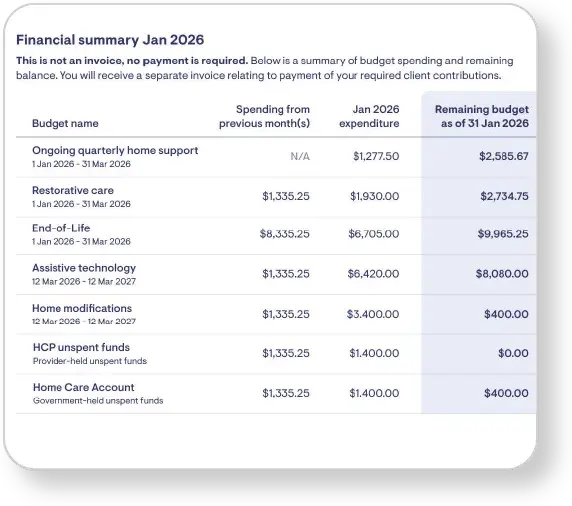
Each Monthly Statement has a snapshot of all your funding on the first page. It includes a list of all your funding types, such as your Ongoing quarterly home support funding, as well as other funds like Restorative care, and Assistive Technology funding if you are receiving these.
Each fund shows the total of any funding spent in previous months, the total amount spent this month, and the remaining balance for each fund.
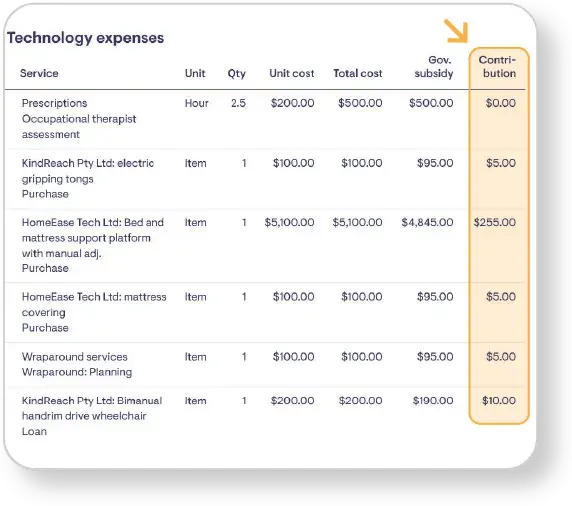
You can see how much you pay for each service on Expenses page of your Monthly Statement, listed under 'contributions'. You will also be issued a seperate invoice for the full amount you will be required to pay each month.
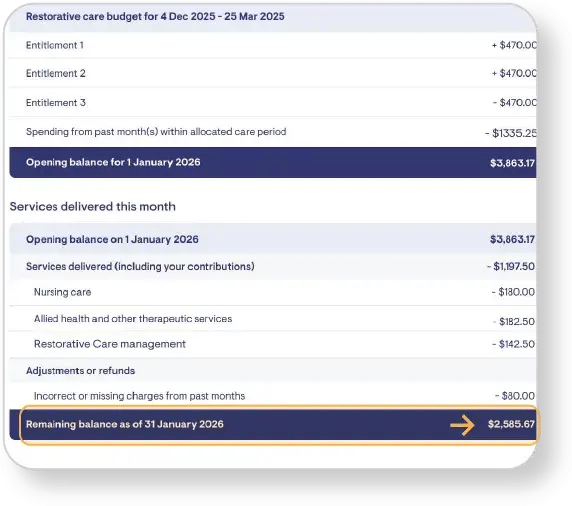
The remaining balance of your quarterly budget can be seen on the first page of your statement, which provides an overview of all your available funding. For each fund you receive - such as Restorative Care or Home Modification funding - you will also see the remaining balance on the summary page for each of those individual funds.
Any unspent funds are also set out separately on an unspent funds page.
On the Expenses page of your statement, you will see each service listed includes the date of the service, the name of the service provider, and the details of the service cost. You will also see the amount you have contributed to your services in the contributions column, as well as the amount that has been paid from your support at home funding, listed under Government subsidy.
Prior to Sept 2021, client funding was held by the home care provider. Now, all funding remains with the government until we submit expense claims on your behalf each month.
As such, some people that have long held funds from prior to Sept 2021, will see these listed under HCP unspent funds as well as anu current unspent funds listed as Home Care Account.